
UTM Tracking for Meta and Google Ads: How to Actually Know What's Working
If you're running Meta and Google Ads simultaneously, you've almost certainly noticed that the numbers don't add up. Meta reports 40 conversions. Google claims 35. Your Shopify dashboard shows 50 orders. Add those platform numbers together and you've apparently sold more than you actually have.
This isn't a glitch. It's attribution overlap - both platforms taking credit for the same sale - and it's one of the most common sources of confusion for D2C brands scaling their ad spend.
UTM tracking won't solve attribution entirely, but it gives you a layer of data that sits outside the platforms and helps you understand what's actually driving traffic and revenue. Here's how it works and how to set it up properly.

WHAT UTMS ACTUALLY ARE
UTM stands for Urchin Tracking Module - not important, but now you know. What matters is that a UTM is a tag you add to any URL you're sending people to. When someone clicks that link, Google Analytics records where they came from.
A tagged URL looks like this:
https://yourstore.co.uk/product?utm_source=meta&utm_medium=paid-social&utm_campaign=summer-sale
The three parameters doing most of the work:
utm_source — the platform (meta, google, email, linkedin)
utm_medium — the channel type (paid-social, cpc, newsletter)
utm_campaign — the specific campaign name

WHY THIS MATTERS WHEN YOU’RE RUNNING META AND GOOGLE TOGETHER
Both platforms use their own attribution models and both are incentivised to claim as much credit as possible. Meta defaults to a 7-day click, 1-day view window. Google uses data-driven attribution. Neither tells you the full picture.
UTM data in GA4 is platform-neutral. It records the last clicked source before a session, which means when you look at your GA4 traffic by source/medium, you're seeing one version of the truth rather than two competing ones.
This won't perfectly reconcile your platform dashboards - nothing will - but it gives you a consistent baseline to make budget decisions from. If Meta is claiming 40 conversions but GA4 UTM data shows 18 sessions from Meta that converted, that gap tells you something important about how much weight to put on Meta's reported numbers.
THE NAMING CONVENTION THAT KEEPS YOUR DATA CLEAN
This is where most businesses go wrong. Inconsistent UTM naming means your GA4 data becomes fragmented and unreadable fast.
A few rules that make a real difference:
Always lowercase. GA4 is case-sensitive. Meta and meta appear as two separate sources.
Use hyphens not spaces. Spaces encode as %20 and break your data.
Keep utm_source to the platform only. Don't put campaign details here — that's what utm_campaign is for.
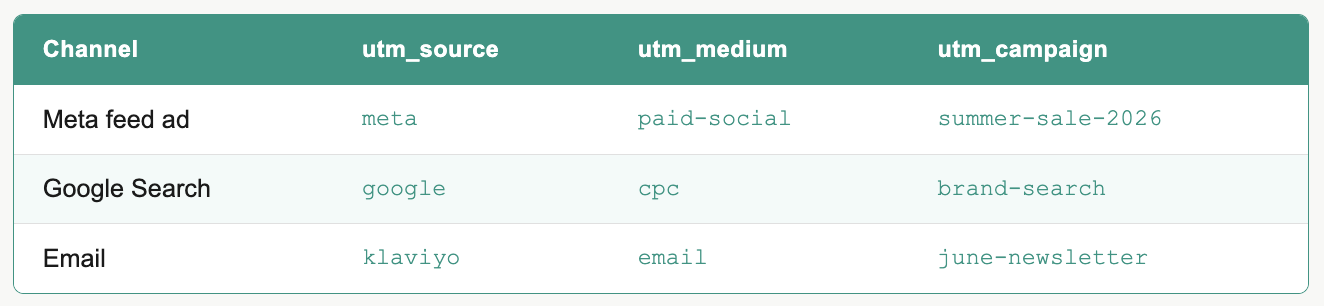
Be consistent with utm_medium across all paid channels. We use paid-social for Meta and LinkedIn, cpc for Google. Pick a convention and stick to it.
A simple structure that works across both platforms:
HOW TO BUILD UTM LINKS
Google's Campaign URL Builder is free and takes 30 seconds per link. For ongoing use though, a shared spreadsheet template that generates the UTM and logs what you've created is far more practical - especially when multiple people are building links or running campaigns across both platforms.
We've built a template that we use with every client. It handles the link generation and keeps a clean record of every UTM used - so six months down the line you can still tell what /articles/summer-sale-2026 referred to.
WHAT TO DO WHEN GA4 STILL DOESN’T MATCH YOUR PLATFORMS
It won't. Accept that upfront. The goal isn't a perfect match - it's a consistent gap you can account for.
If your Meta-reported ROAS is 4x but GA4 is showing 1.8x from that source, the truth is probably somewhere in between. UTM data helps you track that ratio over time. If it stays consistent, you can factor it into decisions. If it suddenly widens, that's a signal something has changed - tracking issue, attribution window change, or a genuine drop in Meta's contribution.
The brands that make the best budget decisions aren't the ones with perfect data. They're the ones who understand their data's limitations and build a decision framework around them.